Unidirectional Data Flow Architecture in SwiftUI Without Third-Party Frameworks
Swift's native stack now supports unidirectional data flow without external libraries.
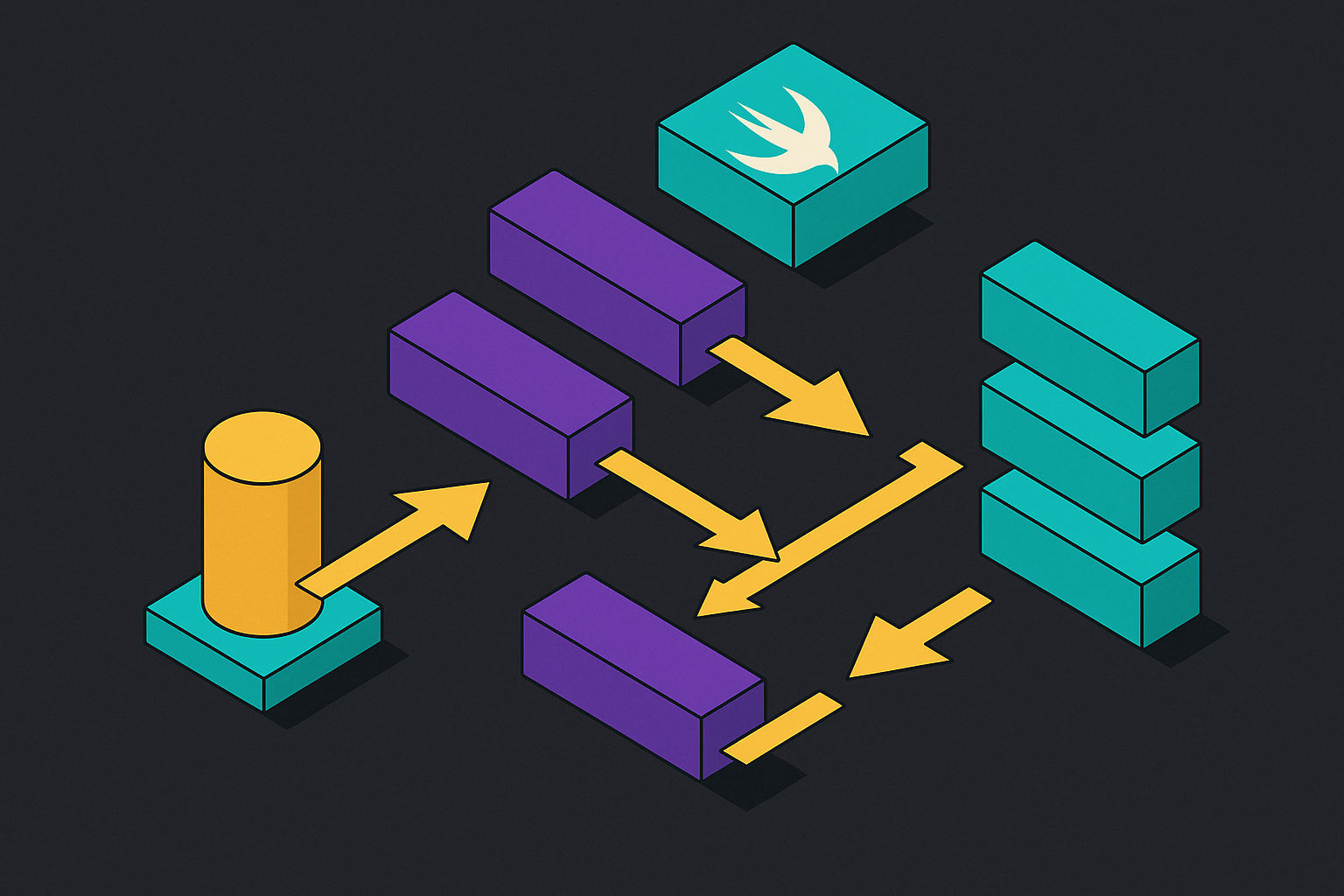
Unidirectional data flow means data moves one way, from state down to the view, and the view never gets to reach back up and change that state on its own. That constraint sounds small until you've debugged an app where it's missing. MVVM and MVC, in their common iOS implementations, allowed any layer to mutate state at any time, making bugs hard to reproduce and trace.
SwiftUI makes this worse if you let it, not better. The framework's declarative style hides a temptation: put more and more logic into the view because it's right there, convenient, and compiles fast. Without discipline, views balloon in size, view models do everything, and no one can touch a screen without breaking three others.
The instinct many engineers have when told to fix this is to reach for a single, app-wide state container, one giant struct holding everything the app knows. That's a misreading of what UDF actually requires. UDF does not demand one global container; a per-feature store, scoped to a screen or a flow, is a legitimate and often better design. A single monolithic store means every state change, however small, has the potential to invalidate and refresh the entire view hierarchy, which is a performance problem in any app with real depth to it. Per-feature stores contain the blast radius. A change to a shopping cart doesn't ripple into the settings screen because the settings screen was never watching the cart's store.
Whether UDF requires a framework given how the 2026 native stack undermines that assumption
The working assumption across a lot of iOS engineering has been that UDF and third-party frameworks are the same conversation, that you can't really do one without picking the other. That deserves a fair accounting first, and here is a direct challenge to it. They solve genuine problems: consistent action logging, testing scaffolds, dependency injection patterns baked in from day one. None of that is in dispute.
But every one of those libraries is also a dependency, and a dependency is a surface you now own the risk of. Every dependency is a surface area: build compatibility, migration cost, Swift version coupling, and the cognitive overhead of a library's own abstractions on top of SwiftUI's are all real costs.
What's changed by 2026 is that the native stack has caught up to the job those libraries were doing. SwiftUI for views, @Observable for state, NavigationStack for routing, and SwiftData for persistence now form a coherent set of native primitives that together cover what frameworks were filling in for. Swift 6's strict concurrency checking acts as a structural forcing function: the compiler itself now enforces data-race safety, handing a framework-free architecture the same guarantee a library used to provide only by convention and code review discipline. Third-party UDF libraries for SwiftUI, including SwiftUI-UDF, TCA and others, exist and are actively maintained, and they solve real problems.
The @Observable macro as a replacement for property-wrapper sprawl in the State layer
The old @Published/ObservableObject model had one structural flaw that mattered more than people gave it credit for at the time. Changing any single @Published property on an object caused every view subscribed to that object to re-render, even a view that did not actually read the property that changed.
@Observable fixes this at the property level. Only views that actually read a given property re-render when that property changes, which is a meaningfully different granularity of update than the old model offered. Practically, this means no more decorating every single field with @Published, and no more objects that are half plain properties and half wrapped ones for no clear reason. @Observable only works on classes, not structs, which is fine, because the store itself should be a class anyway.
Choosing the right property wrapper around an @Observable object comes down to who owns it and what the view intends to do with it. @State is the right choice when the current view is the one creating and owning the observable object, its lifetime tied to the view's own. Use @Environment when the data is meant to be available globally, things like app-wide settings or a shared model that many unrelated views need to read. Use @Bindable specifically when binding UI controls to properties of an external observable object it doesn't own outright. And when a view only needs to read state and be notified of changes, no wrapper is needed at all; a plain property reference is enough.
This is where the State responsibility in UDF gets fulfilled without any external library. The store class exposes private(set) var state. Any view can read it freely, but nothing outside the store can assign to it directly. The compiler enforces this at the point of declaration. It's enforced by the compiler, at the point of declaration. The @Observable framework eliminates the Combine dependency under the hood.
Building the Store: a generic, @Observable class that owns state and routes actions through a pure reducer
The store pattern that emerges from this, drawn from the Swift-with-Majid pattern, is small enough to hold in your head all at once. Declare @Observable final class Store<State, Action>. Give it private(set) var state: State, readable from outside, writable only from within. Inject a pure reducer function as private let reduce: (State, Action) -> State. Then give it exactly one method that any view is allowed to call: func send(_ action: Action), which passes the current state and the incoming action into the reducer, and assigns whatever comes back as the new state.
That's the entire mutation surface of the app, one function, one entry point. There is no second door.
Genericity is what makes this reusable across an entire codebase rather than a one-off pattern copied and modified by hand for every screen. The same Store type works for every feature; the reducer is the only thing that changes from feature to feature.
State should be a struct, not a class, and this isn't a stylistic preference, it's load-bearing. That property alone makes the "old state versus new state" comparison inside a reducer trivially safe to reason about, because the old state's immutability guarantees it genuinely can't have changed mid-computation.
Actions should be an enum, for a related but distinct reason. An enum lets the reducer's switch statement be exhaustive, and Swift's compiler checks that exhaustiveness at build time. Adding a new action case to the enum and forgetting to handle it in the reducer causes the project to simply not compile. That's a build error instead of a runtime surprise discovered three weeks later in a crash report.
Swift 6 strict concurrency enforcing the UDF contract at compile time
Strict concurrency checking in Swift 6 isn't advisory. It used to be the kind of thing Xcode flagged with a yellow warning triangle you could ignore for months. Now it's a build failure, full stop, and code that exhibits a genuine data race does not ship, because it does not compile.
For the store, this turns into a natural home for @MainActor isolation. Mark the store actor-isolated to the main actor, and every state mutation that flows through send happens on the main thread, guaranteed, without requiring any caller anywhere in the app to remember to dispatch to the main queue by hand. The discipline that used to depend on every engineer on a team remembering a rule now gets enforced by the type system instead.
SwiftUI helps here too, structurally. Every SwiftUI view is implicitly isolated to the main actor already, and that isolation is inherited by the view's own member properties and methods. A data model instantiated inside a view picks up correct isolation without a single explicit annotation written anywhere. Swift 6.2 pushed this further with what's been called "approachable concurrency," where new projects created in Xcode 26 default to main-actor isolation out of the box. Sequential, everyday UI code stays quiet and compiles without ceremony, while genuine background work has to opt in explicitly using @concurrent. The default assumption flipped: code is main-actor unless you say otherwise, rather than the reverse.
Handling side effects and async work without a framework's Effect type
Pure reducers, by definition, can't do anything impure. They can't hit the network, they can't read the system clock, and they can't talk to a database or a file on disk. Those are all side effects, and any UDF architecture needs a disciplined, principled place to put them, because "nowhere" is not an option once the app needs to actually fetch data.
The native answer doesn't require inventing an Effect type the way some frameworks do. The store's send function can itself be async, or, more commonly, side effects can live in a separate method on the store that kicks off a Task and, once that task resolves, calls send again with the result packaged as a new action.
The shape of it in practice: the store holds onto actor-typed services, a networking actor, maybe a separate persistence actor. A view calls store.send(.fetchProducts). The store's handler for that action fires a Task, awaits the networking actor's response, and then calls send(.productsLoaded(result)) once the data comes back. The result flows back into the exact same reducer, through the exact same single entry point, as any other action in the app. Nothing about the async boundary breaks the "one door in" rule.
Structured concurrency handles cancellation as a side benefit of this design, rather than as something bolted on. When a screen disappears mid-fetch, the task tied to that screen's lifecycle cancels naturally; in cases where cancellation needs to be explicit and deliberate, the store can hold onto task handles directly and cancel them on command.
Wiring state to views: typed navigation with NavigationStack and scoped observation
NavigationStack with typed navigation paths gives type-safe, testable, programmatic navigation, and is a complete replacement for NavigationView. A navigation path built from a concrete, typed value means the compiler catches a mistaken destination the same way it catches a mistyped property name.
Pushing a screen and popping a screen become actions, routed through the same reducer as everything else. The entire navigation history of a screen is auditable through the same channel as its data. There's no second, hidden state machine tracking where the user is that the rest of the architecture has to reason about separately.
Scoping matters just as much on the view side. Child views should receive a child store, or a narrow slice of the parent's state, never a bare reference to the root store itself. This preserves the exact advantage per-feature stores were built to provide in the first place, and it keeps a change deep in one feature from rippling upward and forcing a re-render of views that never asked to observe it.
Because state is a plain struct, Xcode Previews stop requiring mock objects or protocol-based fakes, a quieter benefit that appears constantly during day-to-day development. Construct the struct with whatever initial values a scenario calls for, drop it into a store, and render the view.
Testing a framework-free UDF store and its reducer
The reducer, being a pure function, is close to the easiest thing in an iOS codebase to test properly. Given a known starting state and a known action, the returned state is fully determined, so a test just asserts on that return value. No mocking framework, no async test helpers, no library-specific test harness required.
The entire test runs synchronously and depends on nothing external to the function call itself.
None of this works cleanly, though, unless State and Action conform to Equatable, and to Hashable where a test or a navigation path needs it. Skipping that conformance turns every assertion into an awkward field-by-field comparison instead of a single clean equality check. It's a small requirement to add up front and a genuine annoyance to retrofit later.
Testing the async side effects follows a similar logic but at one remove. Swap the real actor-typed services for fake actors at the point the store is constructed, then test the actions that flow back into the reducer once those fake services resolve, rather than testing the networking layer itself. The reducer test and the effect test stay separate concerns, which is the separation the architecture was built to produce.
This architecture's direction with on-device AI added to the loop
The same architecture extends cleanly once an on-device language model enters the picture, because the integration point is exactly where it already belongs: an action. The model's output becomes an Action that flows into the existing reducer; the model itself never touches state directly, it produces structured data, and the reducer handles that data the same way it handles a tap on a button or a network response coming back.
Apple's Foundation Models framework is the Swift-native API for this, giving apps text summarization, entity extraction, and content generation running on-device, with no network dependency and none of the latency a server round-trip would add. The @Generable macro sharpens this further: it lets a developer define the exact data structures the on-device model should output, and because that output is structured rather than free text, it maps directly onto typed Action payloads in the reducer. The model, in effect, becomes a typed action producer.
Core AI is an on-device inference framework running larger models locally in native Swift, with no server and no per-token cost, extending the same privacy and latency advantages to heavier workloads. The store, the reducer, and the single-entry-point discipline built out of nothing but native Swift primitives turn out to be exactly the right shape to receive that kind of input, because the architecture never cared what produced the action in the first place, a tap, a timer, or a language model running quietly on the device itself.