Modular Swift Package Architecture in Large Consumer Apps
Breaking monolithic iOS apps into independent Swift Packages cuts build times and team friction.
A banking app with 200 view controllers stuffed into one Xcode target is a diagnosis. It's a diagnosis. Modular Swift Package architecture is the structural discipline that keeps large consumer iOS apps buildable, testable, and sane to work in as headcount grows, and knowing how to draw the boundaries correctly is one of the clearest markers separating senior iOS engineers from everyone else on the team.
Walk into most legacy iOS codebases and the pattern repeats with almost comic reliability. Feature folders named Home, Profile, Login. A "Common" or "Shared" folder holding Networking and Models, used by everyone, understood fully by no one. View controllers that fetch their own data, cache it, format it for display, and handle navigation, all in a single sprawling file. None of this happened because anyone made a bad decision on day one. It happened because nobody made a boundary decision at all, and the app grew the only way software grows without one: outward, in every direction, at once.
The real disease here is tight coupling, not file count. When Feature A reaches directly into Feature B, changing B means understanding A, and probably C and D too, before anyone can ship a one-line fix with confidence. Multiply that by a team of eight or ten engineers editing the same target simultaneously, and merge conflicts stop being an annoyance and start being a tax on every single pull request. That tax compounds. A ten-person team on a monolith doesn't move ten times faster than a solo developer, because coordination overhead eats the gains. The fear of touching old code, the "let's not refactor that, it works" instinct that calcifies over time, is a symptom. It's a symptom. The root cause is the absence of boundaries, and the fix is architecture. It's architecture.
Why SPM is the right tool and what it replaces
Swift Package Manager is the package manager Apple recommends for new iOS code, and that's a platform decision, not a preference. Because SPM is first-party, it gets deep integration with Xcode, with the Swift build system, and with the rest of Apple's tooling in a way third-party solutions structurally can't match.
Before SPM matured, teams reached for CocoaPods, Carthage, or hand-rolled Xcode framework targets. Each came with its own tax: workspace files to manage, build scripts to babysit, and version conflicts that ate whole afternoons. According to moldstud.com, over 70% of developers run into library conflicts under these older systems. SPM's use of semantic versioning goes after that exact problem directly, at the dependency-resolution layer, instead of leaving it for someone to untangle manually at 11 p.m. before a release.
Right now, a lot of teams are running two migrations at once, moving off CocoaPods and onto SPM while also moving from Swift 5 to Swift 6, and that's worth planning on purpose rather than rushing. Teams should plan that on purpose rather than rushing. CocoaPods hasn't broken. It's in maintenance mode, with a confirmed read-only sunset date of December 2, 2026, so nothing is on fire. The case for migrating is about where the architecture needs to go over the next few years, not an emergency happening this quarter.
What SPM actually buys a team: native support inside Xcode, no separate build scripts to maintain, per-module test targets included by default, and clean behavior in CI/CD pipelines without extra glue code. Current thinking on this, as of mid-2026, has crystallized into something like a maxim: the Xcode project itself should be almost empty, maybe 10 to 15 lines of actual configuration, with everything else living inside Swift Packages. The App target's job is to compose modules together. It shouldn't contain them.
How to design module boundaries that hold
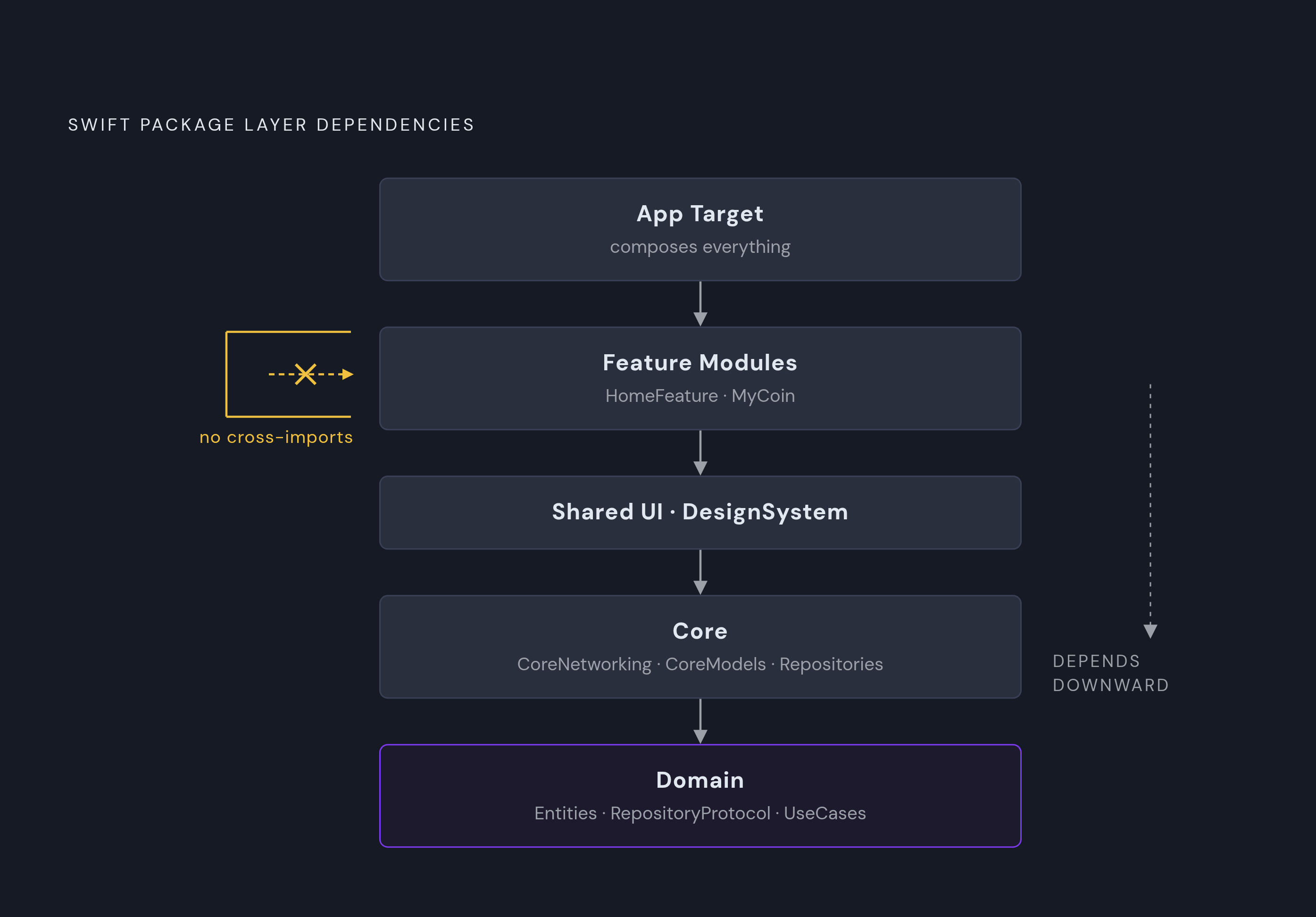
One rule sits above all the others: feature modules depend on Core or Infra layers, never on each other. The moment one feature module imports something from another feature module directly, the boundary has failed, no matter how clean either module looks internally.
A layer hierarchy that holds up in production usually looks something like this. The App target sits at the top, doing nothing but composing everything else together. Below it, feature modules like HomeFeature or a module built around a specific product line (something like MyCoin, self-contained end to end) run one level down. Below that sits Shared UI or a DesignSystem module. Underneath that, Core, split into things like CoreNetworking, CoreModels, and Repositories. And at the base, Domain: Entities, RepositoryProtocol, UseCaseProtocol, and the UseCases themselves.
The principle running through all of it is dependency inversion, the "D" in SOLID, applied at the module level instead of just the class level. Modules depend on abstractions (protocols), not on concrete implementations. A feature module asks for something that conforms to RepositoryProtocol. It never asks for the concrete repository class sitting three layers down.
The seam that makes this real in practice is the transformation from raw data model to domain model. Networking code produces raw DTOs, ugly, tied to whatever the API happens to return this week, and converts them into clean domain objects before anything else in the app touches them. ViewModels and business logic never see a DTO. They see a domain model, and the networking layer stays isolated behind that wall.
Package.swift is a contract. It's a contract. It declares dependencies, targets, and build settings, and a well-written one is functionally the module's public API, stating what this piece of code needs and what it exposes. Treat it with the same care given to a public method signature, because that's effectively what it is.
Forasoft.com puts the sizing range that tends to work well for a typical consumer app at 6 to 10 modules. Past 15, the returns start shrinking and CI overhead starts climbing, since every module boundary adds some build and test overhead even when it's paying for itself in isolation.
The architecture pattern used inside a package (MVVM-C, VIPER, RIBs, unidirectional data flow, The Composable Architecture) is a separate decision from how packages relate to each other. Pick one deliberately for a given module, apply it consistently inside that module, and don't feel obligated to use the same pattern everywhere. What matters more is that each module can be built and tested on its own, without dragging the rest of the app along. If a feature module needs the whole app compiled just to preview one screen in SwiftUI Previews, the boundary isn't actually independent yet, whatever the folder structure suggests.
The concrete build-time and team-coordination payoff
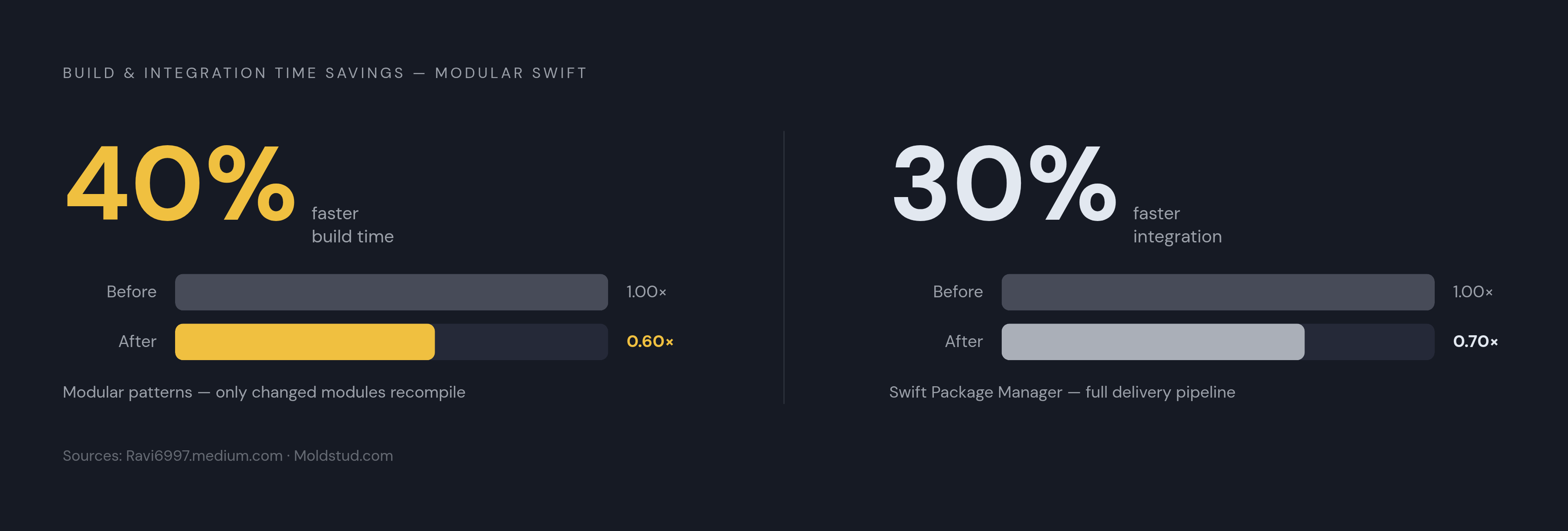
Ravi6997.medium.com reports that proven modular patterns cut build times by 40%, largely because only the modules that actually changed need to recompile. Everything downstream that didn't change stays cached.
There's a second gain sitting next to that one. Moldstud.com reports that using Swift's built-in packaging tool can cut integration time by roughly 30%, which speeds up the whole delivery pipeline, not just the local build on one engineer's machine.
The coordination dividend matters just as much as the raw numbers, arguably more once a team crosses a handful of engineers. Parallel work across feature modules becomes genuinely possible without constant merge conflicts. A designer polishing a UI module, a backend-focused engineer wiring up a new networking layer, and a junior developer fixing a bug in a feature module can all commit at the same time without ever touching the same files.
Structural separation makes testability a built-in outcome rather than a bolted-on afterthought. When components are separated by hard module boundaries, unit tests naturally stay scoped to what they're actually testing, because there's no way to accidentally reach across into unrelated code. Reusability follows the same logic: a well-built payment processing module becomes a candidate for reuse across targets, since it never depended on anything specific to one platform's app target in the first place.
The SwiftUI Preview benefit deserves its own mention here, separate from the demo-friendly framing it usually gets. In a properly modularized app, previewing one feature means building that one module. That's a real, daily build-time saving.
What Swift 6 concurrency changes about modular boundary design
Swift 6's strict concurrency checking catches data races at compile time. That's a meaningfully different failure mode than catching them at runtime on a stranger's iPhone, three weeks after release, via a crash report nobody can reproduce locally.
For module boundaries specifically, this means actors, async/await, Sendable conformance, and structured concurrency all need to be handled correctly at every point where one module talks to another. A boundary that quietly passes mutable state across threads used to just be a latent bug. Under Swift 6, it's a compiler error, which is a better place for that problem to live, even if it makes the initial migration more painful.
A Claris (an Apple company) job listing for a Senior Software Engineer, Swift, on macOS, posted in July 2026, spells out exactly what the industry expects now: a strong grip on Swift concurrency (actors, async/await, Sendable, structured concurrency), plus real experience working inside layered modular architectures with strict dependency management. That same listing goes further, describing production Swift code built inside a layered SPM architecture with strict dependency management across multiple targets and layers up to the App target. That's a real reference point for how far this goes once an app reaches real scale.
None of this is simple, and it shouldn't be presented as solved. Plenty of teams are handling the Swift 5-to-6 concurrency migration and the CocoaPods-to-SPM migration at the same time. The concurrency model is one more variable in an already complicated transition, not a reason to put either migration off. If anything, it raises the stakes on getting the module boundaries right the first time, since a badly designed boundary now fails loudly instead of quietly.
How modular SPM architecture becomes the foundation for on-device AI features
WWDC 2026 brought a real platform shift: Apple shipped Core AI, an on-device inference framework that runs large language models locally, written in native Swift. No server round-trip, no per-token cost, and it keeps working offline while keeping user data on the device.
Apple's AI surface for developers now has a few distinct pieces. The Foundation Models framework gives a single Swift API for both on-device inference and Private Cloud Compute inference. App Intents exposes what an app can do to the system assistant. Core AI handles running custom or bring-your-own models directly on-device.
App Intents is now the required path for this kind of integration; SiriKit is deprecated as of WWDC 2026. A senior engineer needs to know how to model intents, entities, and app shortcuts correctly, because this is the interface through which the system assistant actually understands what an app is capable of doing.
The bigger shift is agentic. On-device AI can now plan and run multi-step tasks across different apps using App Intents. That moves the iPhone from a tool someone operates by hand toward something closer to an assistant that executes tasks on someone's behalf, using an app as one tool among several rather than as the sole point of entry.
Typed generation matters most architecturally. Apple's Foundation Models framework supports guided generation through the @Generable macro and constrained sampling. Model output arrives as typed application state, not as a raw string that needs regex parsing and a prayer. That pattern belongs inside its own dedicated AI module, cleanly separated from everything else.
Which is exactly why the module boundaries discussed earlier matter here specifically. AI inference, App Intent modeling, and domain logic need to live in separate, independently testable modules. Blur that line and the app ends up with the same coupling problem the original monolith had, except now with non-deterministic model output tangled into the mix, which is a considerably harder thing to debug than a plain function call gone wrong.
The concurrency discipline from the previous section carries straight through here. UI updates stay on @MainActor, inference runs inside async tasks, and Xcode will flag data races when large tensors or model outputs get passed between threads incorrectly. None of that changes because AI is involved. It just raises how much is riding on getting it right.
Apple's stack isn't the only option, either. The LLMFarm Core Swift library, released under an MIT license, lets teams bring open-source LLMs into iPhone, iPad, and Mac apps directly. For teams that need a model outside Apple's own ecosystem, that's a legitimate path, and it belongs in its own module, structured the same way an Apple Core AI integration would be.
What this architecture means for how a senior iOS engineer thinks about their work
Deciding how many modules an app needs, what belongs in Core versus what belongs in a feature module, how the layers get named and enforced: none of that is implementation work. Those are architectural decisions, and they carry consequences a team will live with for years. Senior judgment is visible in how a team makes those architectural decisions, not in how cleanly someone writes a single view model.
That Claris job listing from July 2026 is one concrete signal of where production expectations have moved. Production expectations now include layered SPM architecture with strict dependency management across multiple targets, and Swift 6 concurrency handled correctly throughout. A generalist engineer, however talented, isn't automatically equipped to own that without deliberately building the specific judgment it requires.
An engineer who can design module boundaries correctly can also bring a team into them, and that leadership capacity is part of what makes the boundaries work. An engineer who can design module boundaries correctly can also bring a team into them, and at that point the architecture itself becomes the coordination mechanism. Fewer meetings are needed to keep people from stepping on each other, because the boundaries are doing that job structurally instead of through constant verbal alignment.
Most engineers won't get to build this from a blank canvas. They'll inherit an existing monolith and have to migrate it carefully: planning the path deliberately, not tearing CocoaPods out overnight, handling the Swift 5-to-6 concurrency shift as its own distinct project rather than folding it into the same sprint as the module split. That kind of sequencing, knowing what to tackle first and what to let sit, is itself a form of judgment, and it's harder to teach than any single design pattern.
SwiftUI is now the default starting point for most new Apple platform apps. Combine that with iOS 26, Swift 6, the Liquid Glass design language, and first-class Apple Intelligence APIs, and the bar for what counts as a good iOS app has moved up noticeably. Modular SPM architecture is what makes hitting that bar sustainable, build after build, release after release, instead of a one-time push that decays the moment the next feature gets bolted on.
None of this is a refactoring luxury reserved for teams with spare sprint capacity. It's the structural discipline that keeps large consumer iOS apps maintainable, testable, and fast to build as they scale. The engineers who know how to draw those boundaries correctly are the ones who end up leading teams, shipping at the scale of a Fisker or a Lululemon or an Apple, and building the next generation of on-device AI features without quietly signing up for years of structural debt.